

ATAS Options X-Ray Strike Profile and Strike Heatmap: Who Holds the Risk
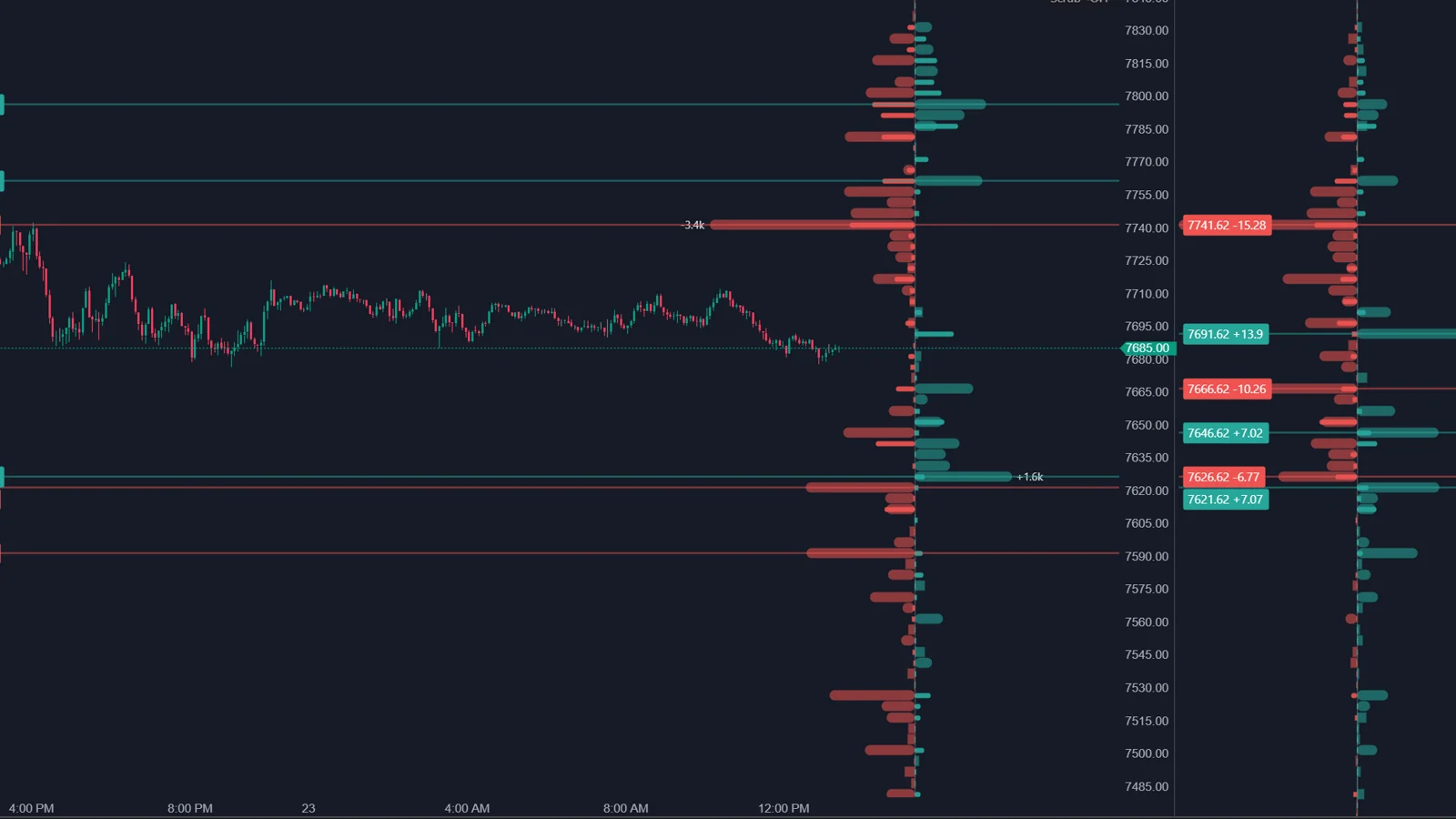
Options X-Ray: Strike Profile shows, strike by strike, how much risk sits at each SPX option strike and who holds it: market makers in gamma, delta, vanna or charm terms, or retail traders, professionals, firms and brokers. Strike Heatmap shows the same data across the session. Values are in ES contracts, update every minute, and can be reviewed for any bar of the day.
What does Strike Profile show?
Where the large positions are, and whose they are, depending on the Positioning setting.
| Positioning | What it shows |
|---|---|
| Gamma (GEX) MM | Where market maker hedging may damp or amplify movement (default) |
| Delta (DEX) MM | How many ES futures market makers hold against each strike |
| Vanna (VEX) MM | Where market makers may need to trade ES if volatility changes |
| Charm (CEX) MM | Where market makers may need to trade ES because time passes |
| Participant group | Position of retail, pros, firms, brokers or all clients, without market makers |
ATAS stresses that this is not open interest: the profile shows risk at a strike, not the number of contracts, so a far strike with many contracts can take little space. Hovering a bar shows Standing, the position accumulated at the strike including previous days, and Today, how much it changed this session. The two can point in different directions, for example when retail still holds puts bought earlier but sells them today.
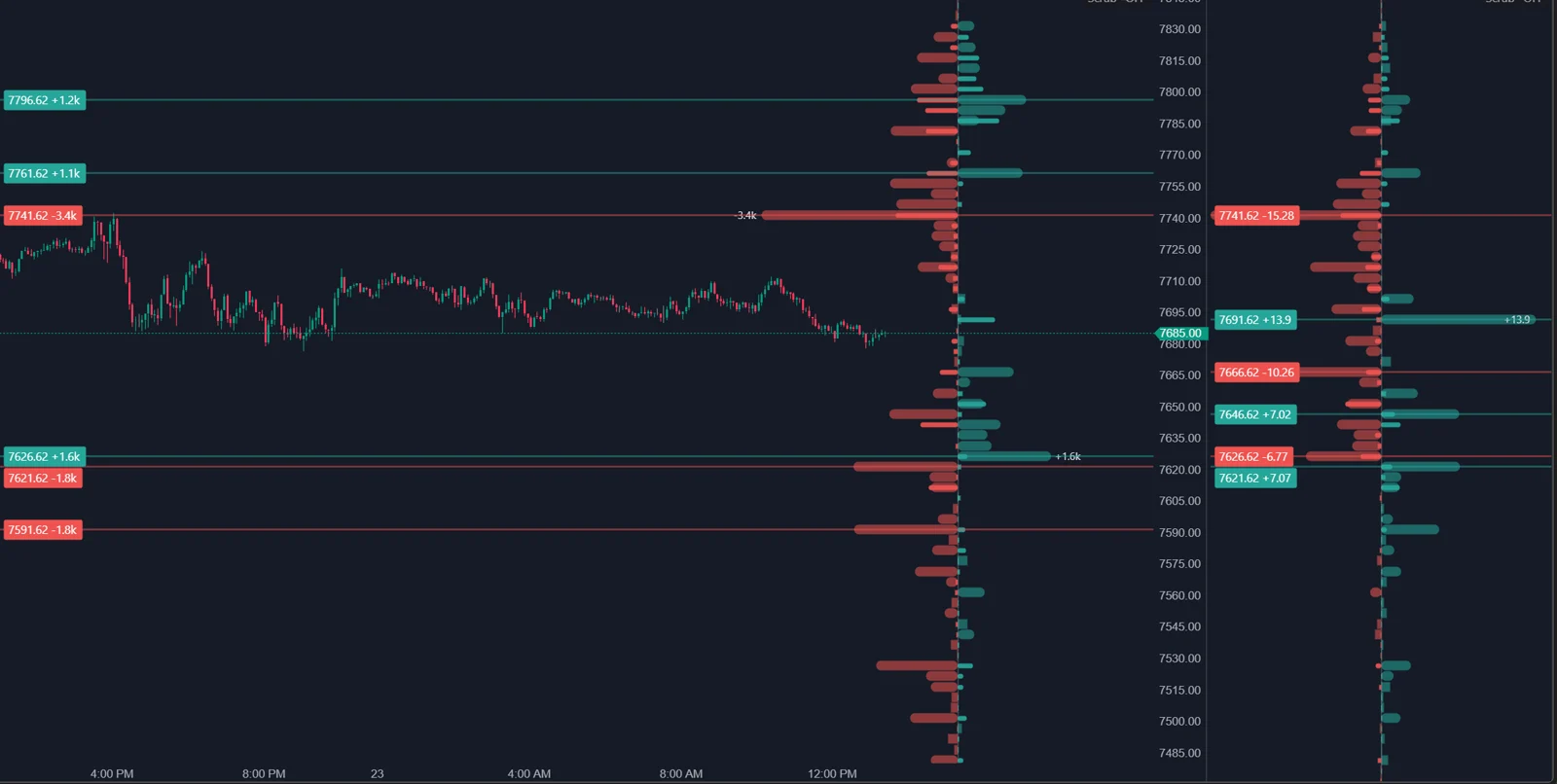
From practice: in the author's own setup in October 2026, the Options X-Ray indicators run in ATAS X. The ATAS help articles do not say which platform version they cover, so treat this as the author's experience.
What can I do with time in the profile?
- Under cursor: the profile follows the bar under the mouse, so you can see what stood at a level at 10:00 or before a sharp move.
- Pinned bar: Ctrl and click fixes the profile on one bar for comparison.
- Multi-session layouts: up to five sessions side by side, each as a snapshot at its own close, to see how the book was built during the week.
- Expirations: 0DTE by default, also next expiration, later dates, this week, rest of week, monthly OPEX, end of month, 7 days or all.
What does Strike Heatmap add?
The story of the session. Each strike becomes a horizontal track behind the candles; it gets brighter when the level gains weight and fades when it weakens or expires. ATAS pairs the two: Strike Profile for an exact snapshot with numbers, Strike Heatmap for where levels appeared, strengthened and disappeared. Comparing 0DTE with Rest of week separates today's levels from those that remain after the close.
Does X-Ray show the real dealer hedging?
It shows market maker positions in SPX options derived from exchange data. The hedging that follows from them is calculated, not observed.
This is the question that matters most for how far to trust the suite, so here is what each source says.
| Source | What it says |
|---|---|
| OptionsDepth FAQ | Market maker positioning is based on participant-tagged exchange data such as Cboe, extracted from exchange-identified participant activity, not inferred from bid and ask spreads or tape heuristics |
| ATAS help, Chain vs. X-Ray | Positions are split by participant group and recalculated every minute, so the market maker position is calculated instead of estimated |
| ATAS learning page | Shows the estimated positioning of participant cohorts, including market makers, based on OptionsDepth methodology; a model-based view |
| ATAS help, X-Ray maps and profiles | Hedging values are worded as what market makers may need to buy or sell; not a trading signal |
| ATAS help, Flow and Big Trades | Market makers are the other side of the trades made by the other groups |
Sources read on 23 October 2026.
Read together: the side of the position, who is long and who is short at a strike, is where X-Ray differs from open interest models. Open interest has no side, so classic GEX has to assume that clients sell calls and buy puts. According to OptionsDepth, X-Ray takes the side from participant-tagged Cboe data instead. ATAS describes market makers as the other side of the trades made by the other groups, so the market maker position is derived from the tagged client flow rather than tagged on its own. The two ATAS pages also word this differently: one says calculated instead of estimated, the other says estimated and model-based.
What remains a model: the Greeks are calculated, and turning a position into ES contracts per point assumes that market makers hedge their delta with futures. Whether, when and where a market maker actually hedges is not in the data. ATAS describes the data as SPX options only, so positions in other products are outside it. The OptionsDepth FAQ does not describe how the participant data is turned into exposure figures, and Big Trades notes that activity opened and closed within the same minute may not be visible.
A fair summary: X-Ray helps estimate market maker hedging needs from positioning derived from participant-tagged exchange data, instead of from an assumption about client behavior. It does not show the hedge trades themselves.
Which settings matter?
| Setting | Default | What it does |
|---|---|---|
| Positioning / Exposure | Gamma (GEX) MM | Which value is drawn |
| Expirations | 0DTE | Which options are included |
| Flow basis | Adjusted | How position changes are calculated; keep it the same across indicators |
| Layout (Strike Profile) | Own vertical panel | Panel, overlay or multi-session |
| Style (Strike Profile) | Net, two-sided | Calls and puts, net two-sided or net one-sided |
| Show walls | Off | Marks the largest positive and negative strikes |
| Show today's flow | On | Adds how much positions changed this session |
How do I work with Strike Profile and Strike Heatmap?
- Check the profile on the last bar: which large levels are near price?
- Move the cursor through the morning, or pin a bar before a sharp move, and compare.
- Hover a large strike: is it an old position (Standing) or built today (Today)?
- Switch to a participant group to see whose position it is.
- Use Strike Heatmap to see when the level appeared, and how price behaved the last time it got there.
FAQ
Why do the values not match open interest?
The profile shows risk at a strike in ES contracts, not the number of option contracts. ATAS says they should not match.
Why did the profile change sharply on Friday morning?
On the third Friday of the month, the monthly series may expire after 09:15 New York time and 0DTE switches to the weekly series.
Can I see firms and retail separately?
Yes. Set Positioning or Exposure to a participant group: retail, pros, firms, brokers or all clients together.
Does Strike Profile include ES options from CME?
ATAS describes the data as SPX options analytics from OptionsDepth. For CME futures options, it points to the Options Chain profiles.
This article is educational content, not financial advice.