

Why Journaling Matters, and How PFT-EdgeBook Is Different
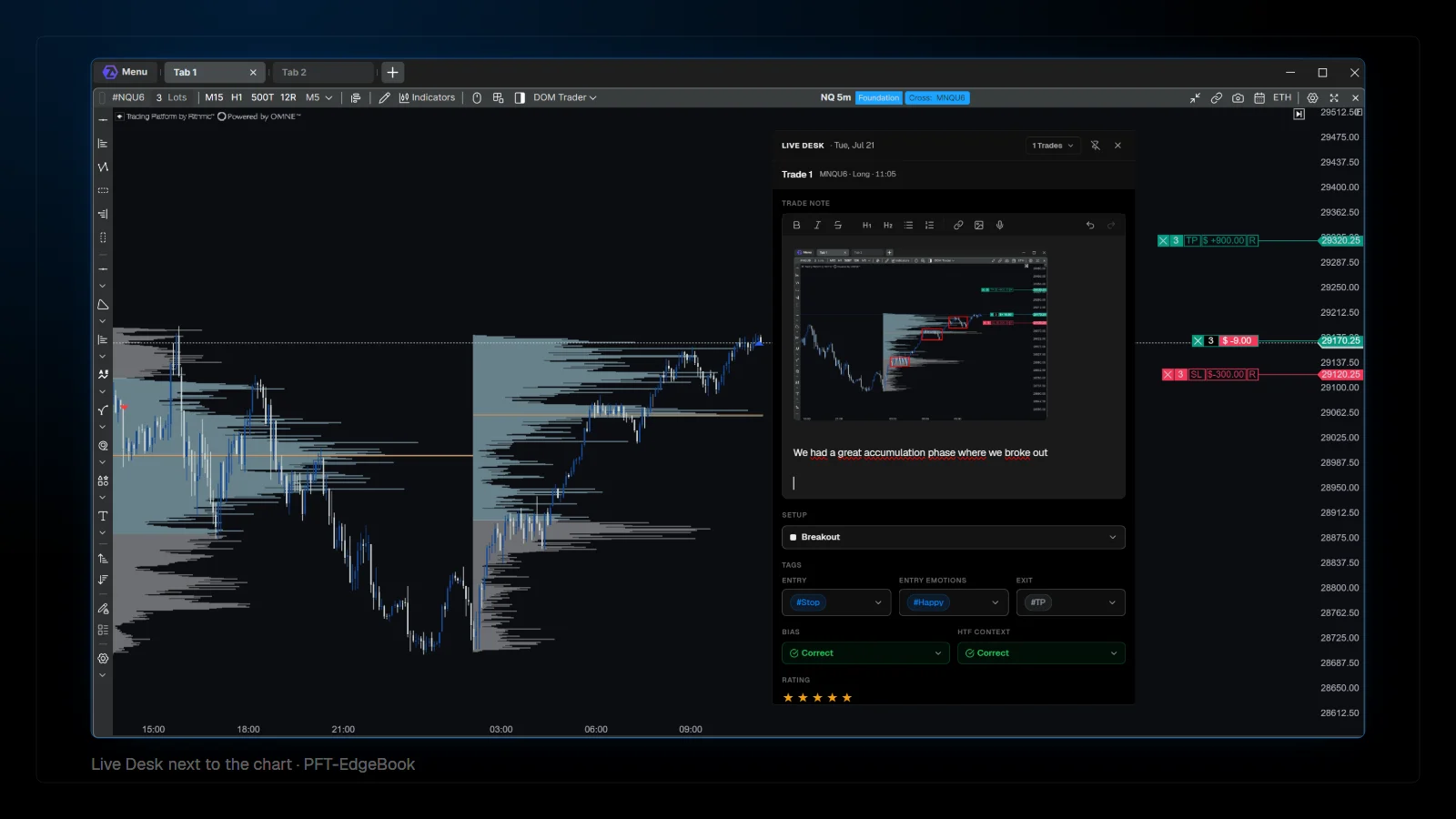
A trading journal matters because memory is a poor record. Notes written after the session describe what you wish you had thought; notes taken while the trade is open show what you actually saw. PFT-EdgeBook records the trade data by itself, live from the platform, so the journaling time goes into the reasoning instead of the bookkeeping.
Why does a trading journal matter?
It turns single trades into a sample you can study.
One trade says almost nothing. Fifty trades of the same setup, with the same notes and the same data, start to show patterns: which setups hold up, where exits leave money on the table, which mistakes repeat. A journal is the tool that turns individual decisions into that sample. It does not make anyone profitable by itself. It helps you see what is actually happening, so you become able to change the parts that cost money.
| Question | What the journal needs |
|---|---|
| Which setup works for me? | Every trade tagged with its setup, and enough trades per setup |
| Are my exits too early? | MFE per trade and what price did after the exit |
| Are my stops too tight or too wide? | MAE per trade compared with the stop |
| Do I follow my rules? | A rule checklist filled in per trade |
| What did I see at entry? | Screenshots and notes from the moment of entry |
Review questions and the data a journal needs to answer them.
Why journal while the trade is open?
Because afterwards you already know how it ended.
Our Masterclass calls it journalmaxxing: capture setup, bias, context and thoughts while the position is still running. A note written after a winner tends to justify it, and a note written after a loser tends to excuse it. A note written during the trade records the actual read, which is the only version worth reviewing later.
What makes PFT-EdgeBook different?
The trade data arrives by itself, live, with information a file import cannot contain.
A common way to journal starts from a file: export the trades after the session, import them, then add notes. PFT-EdgeBook connects to the platform instead. The PFT EdgeBook Bridge, an indicator for ATAS Classic and ATAS X, sends each trade to the journal as it happens, including data that no trade export contains, such as what price did after the exit.
| Feature | What it does |
|---|---|
| Live bridge | The PFT EdgeBook Bridge sends trades from ATAS Classic and ATAS X while they happen; a bridge for NinjaTrader exists as well |
| MAE and MFE | How far each trade ran against you and in your favor while it was open |
| Post-exit window | Keeps watching price after the exit, 30 minutes by default and adjustable, to show what the trade would have done |
| Automatic screenshots | A screenshot of the configured monitor or window at entry and at exit, attached to the trade |
| Chart bars | The candles around the trade, with adjustable padding before entry and after exit |
| Live Desk | A separate window for the open trade: setup, bias, higher time frame context, your rules, rating, tags and notes |
| Voice notes | Dictate instead of typing; the speech model runs on your own computer |
| Imports | Direct import from the ATAS and NinjaTrader trade history, Sierra Chart trade log exports, and CSV from other brokers |
What PFT-EdgeBook records, as of September 2026.
How do you connect PFT-EdgeBook to ATAS?
Install the bridge from the ATAS modules, add it to the execution chart, and check that a test trade arrives.
- Sign in on the website, download the Windows app, and enter the email address of your ATAS account so the bridge can be unlocked for it.
- In the app settings, choose the auto screenshot target. For ATAS X, the video recommends the monitor screenshot.
- In ATAS X, open menu, settings, custom modules, and install the PFT EdgeBook Bridge from the available modules.
- Add the indicator to your execution chart only, so each trade is recorded once.
- Set the chart bars padding and the post-exit window, take a trade, and check that it appears with its bars in the trade tab.
If you trade with a fixed stop and target, set both right at entry. The bridge records them, and the journal can then show risk and reward as planned rather than as reconstructed afterwards.
How does journaling during the trade work?
In the Live Desk, next to the chart.
The Live Desk is a separate window for the trade that is currently open. It can sit on a second monitor while the platform runs on the first. Trades reported by the bridge are listed there with open positions first, and the journaling happens in the moment: setup, bias, higher time frame context, rating, tags and a trade note.
Setups and rules are defined once and then applied per trade. Choosing a setup in the Live Desk brings up the rules attached to it under Your rules, as a checklist to tick while the trade runs. Over time this separates two very different problems: a setup that does not work, and a setup that works but is not followed.
Two hotkeys keep the hands on the chart. The screenshot hotkey captures a monitor into the open trade, in addition to the automatic entry and exit screenshots. The dictation hotkey records a voice note that is transcribed by a speech model running locally on your computer, not on a transcription server, and stored with the trade.
What does the post-exit window show?
Whether the exit was the problem.
MAE and MFE describe the trade while it was open. The post-exit window extends the question: after you closed, how far did price move in the trade's direction, and how far against it? The bridge setting Post-exit window (minutes) defines the time span. It defaults to 30 minutes, and the setup video suggests 10 to 15 for scalpers.
Read it across many trades, not one. A pattern of large post-exit moves in your favor points to exits that are too early. Large post-exit moves against you show that the exit protected the trade.
FAQ
Is PFT-EdgeBook free?
PFT-EdgeBook is the journal inside the PFT Terminal, and the terminal is free.
Which platforms does PFT-EdgeBook support?
Live bridges for ATAS Classic, ATAS X and NinjaTrader. Direct history import from ATAS and NinjaTrader, Sierra Chart through its trade log export, and other brokers through CSV.
Does a journal make me profitable?
No tool can promise that. A journal helps you see what you actually do, so you become able to fix what costs you money.
Do I have to write long notes?
No. A setup, a few ticked rules and one sentence captured during the trade are worth more than a long note written in the evening. Voice notes make the sentence even quicker.
This article is educational content, not financial advice.