

How to Backtest Properly in ATAS X
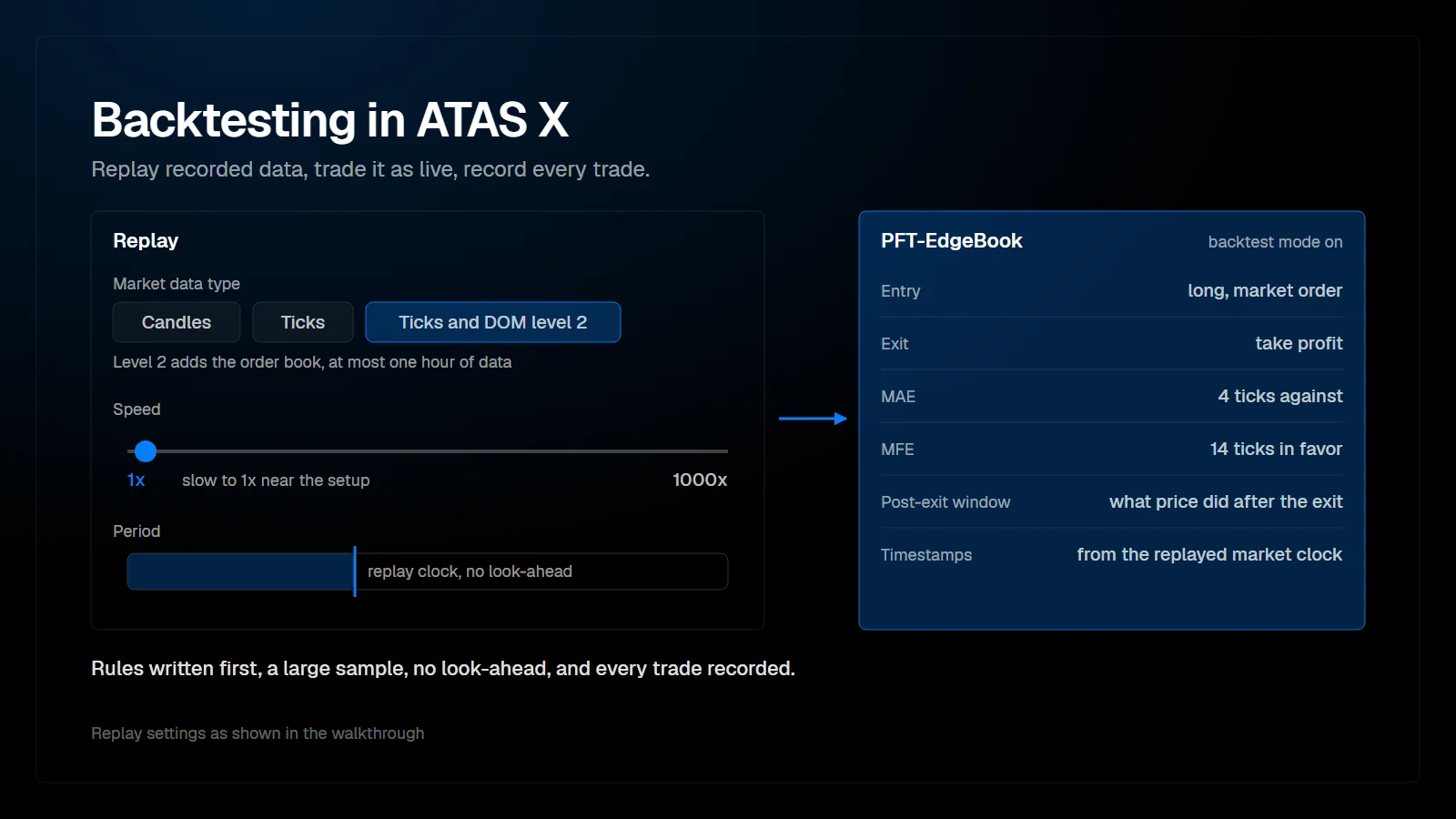
Backtesting in ATAS X means replaying recorded market data and trading it as if it were live. The Replay widget loads candles, ticks, or ticks with Level 2 depth for a chosen period, and trades are placed with normal chart trading. Done properly, it needs rules written in advance, a large sample and an honest record of every trade.
Where is the Replay in ATAS X?
It is a widget: clone a chart, then replace the widget with Replay.
The Replay behaves like any other ATAS X window. Clone an existing chart, choose replace widget, and select replay. The Replay window can be dragged and docked like other widgets. It first reports that the replay is not connected; activating it opens the replay controls.
Which Replay settings matter?
Data type, instrument, period and speed.
| Setting | Options | Note |
|---|---|---|
| Market data type | Candles; ticks; ticks and DOM level 2 | Ticks are level 1, the trades at the top of the book. Ticks and DOM level 2 add the order book, which a heatmap needs |
| Instrument | Any loaded instrument | Replay the contract you actually trade |
| Period | Calendar, or dragged directly on the chart | With ticks and DOM level 2, at most one hour of data can be loaded; ATAS X shows a warning otherwise |
| Speed | From 1x up to 1000x | Slow to 1x near the setup to feel the real market speed |
| Template | Save as template | Optional; a separate backtest workspace does the same job |
Replay settings as shown in the walkthrough.
One restriction shapes the preparation: indicators can only be changed before the replay starts. Volume profiles and drawings stay usable during the replay, but indicators that have to be loaded separately cannot be added or adjusted. Set up the workspace first, then start.
How do you trade inside the Replay?
Exactly as live.
Chart trading works as in live trading: market orders, the same key settings, and the same predefined stop-loss and take-profit templates. With level 2 data loaded, the heatmap runs in the replay as well. Drawings from live trading can clutter the replay chart; the drawing objects menu offers select all and delete all.
What does honest backtesting require?
Fixed rules, enough trades, and no knowledge of the future.
- Write the rules before the first replay: entry trigger, stop placement, target logic and what disqualifies a trade. Rules written after seeing the result fit the past, not the next session.
- Collect a meaningful sample. A handful of trades says more about luck than about the setup, so keep going until the results per setup stop swinging with every new trade, and include different market conditions.
- Avoid look-ahead. Do not scroll the chart forward, and do not pick replay days because you remember how they ended. Test consecutive sessions instead.
- Record every trade, including the ones you would rather forget. Skipping losers inflates the result.
- Keep commissions and slippage in mind. A small edge can disappear once they are included.
- Change one thing at a time. If entry and stop logic change together, the result cannot be attributed to either.
| Mistake | Why it distorts the result | Fix |
|---|---|---|
| Rules defined after the test | The rules fit the sample they were built on | Write rules first, test second |
| Too few trades | Randomness dominates small samples | Keep testing until the numbers stabilize |
| Hand-picked days | Memory of the outcome leaks into the selection | Test consecutive sessions |
| Deciding at high speed | A decision at 100x is not a decision at 1x | Slow to 1x near the setup |
| Only tracking wins and losses | Hides whether stops and exits are well placed | Record MAE, MFE and what price did after the exit |
Common backtesting mistakes.
How do you record replay trades automatically?
With the PFT EdgeBook Bridge in backtest mode.
The bridge indicator has a setting called Backtest mode (ATAS Replay). It is off by default. Switched on, trades taken in the ATAS Replay are recorded like live ones in PFT-EdgeBook: candles, screenshots, stop and target events, fills, MAE and MFE, and the post-exit window. Timestamps come from the replayed market clock, not from the wall clock. The mode only acts on the Replay account and switches itself off as soon as a live fill arrives on a real account.
In PFT-EdgeBook, a separate workspace and a strategy such as Breakout test keep the replay work organized. A strategy is a view on the journal, not a separate folder: new imports land in the active strategy, and every trade also stays in the main journal. After each replay trade, the journal shows entry and exit, how far the trade ran for and against you, and, once the post-exit window has passed, what price did after the exit.
How do you evaluate the results?
Per setup, with more than the win rate.
Look at the win rate together with the average win and loss in R, MAE against your stop, MFE against your target, and the post-exit moves. A setup with a modest win rate and large winners can be sound; one with a high win rate and occasional large losses can be fragile. Replay results are still an estimate. Live trading adds emotions and fills that a replay does not fully reproduce, so a setup that holds up in the replay still deserves a small live sample before it gets full size.
FAQ
Can the ATAS X Replay show the order book?
Yes, with the market data type ticks and DOM level 2, limited to one hour of data per replay.
Why can't I change an indicator during the replay?
Indicators have to be set before the replay starts. Stop the replay, adjust the indicator, and start again.
How many trades does a backtest need?
There is no fixed number. The sample should be large enough that one more trade no longer changes the picture noticeably, and it should cover different market conditions.
Do replay trades end up in my journal?
Only with backtest mode switched on. They come from the ATAS Replay account, and a dedicated strategy gives you a view with only the backtest trades.
This article is educational content, not financial advice.