

Free Trading Journal for Futures: What You Get and Where It Stops
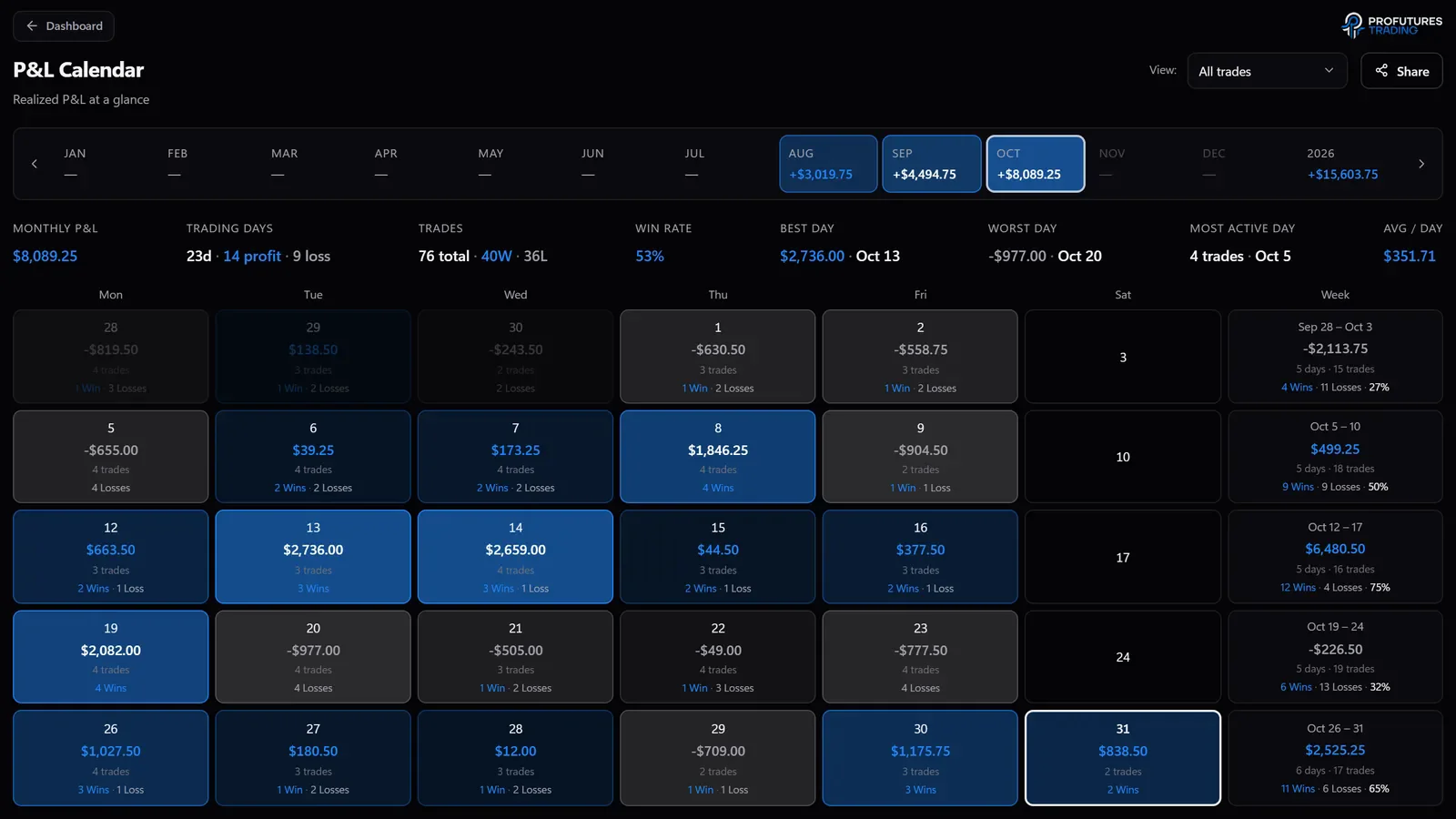
A free trading journal for futures is worth using only if it saves you the typing: it should import your trades from the platform, calculate the statistics and show your results by day. The free plan of PFT-EdgeBook does exactly that, for €0 and without a credit card. It stops at the point where you want to annotate trades, tag setups or see MAE and MFE, and this guide shows where that line sits.
What must a free futures trading journal do?
Five things. If a free journal skips the first one, you will stop using it within a month.
- Import instead of typing. A journal that needs every trade entered by hand dies the first busy week. Trades should arrive from your platform, from live capture or from a history import.
- Statistics that count the right things. Equity curve, drawdown, monthly P&L, expectancy and R-multiples, calculated on net results.
- A calendar. Your P&L day by day shows streaks, outlier days and overtrading faster than any table.
- Charts. You need to see the market the trade happened in, not just a row of numbers.
- Notes, tags and setups. This is where a journal turns from a record into a review tool. It is also the part most free tools leave out.
The first four are in the free plan of PFT-EdgeBook. The fifth is not, and it is better to know that before you start than after you have imported a year of trades.
What does the free plan of PFT-EdgeBook include?
Six things: the journal, trade import, core statistics, a calendar, charting, and the community and news inside the terminal.
| Free feature | What it does |
|---|---|
| EdgeBook journal | All your trades in one journal. |
| Trade import | Trades come in automatically from your trading platform. |
| Core statistics | Equity curve, drawdown, monthly P&L, expectancy and R-multiples. |
| Calendar | Your P&L day by day on a calendar. |
| Charting | Live charts inside the terminal, with your own charting account. |
| Community and news | The community and market news inside the terminal. |
Free plan of PFT-EdgeBook, as listed on the PFT Terminal pricing section. The wording of the right column is the product's own description.
The plan is free permanently, not a trial. There is no credit card at sign-up. The journal itself is a local database on your own computer, and cloud sync is a separate, optional feature of the paid plans.
Two points are easy to misread. First, the free plan imports trades automatically, so you are not limited to a manual log. Second, "charting" means live charts inside the terminal using your own charting account. It is not the same thing as automatic entry and exit screenshots, which belong to the Trader plan.
Where does the free plan stop?
At everything that needs you to annotate or review a trade in depth. Those features start with the Trader plan.
| Area | Added with Trader |
|---|---|
| Journal depth | Notes, tags, setups, emotions, checklist, cloud sync |
| Review | MAE / MFE, automatic screenshots, entry and exit screenshots, trade recording, PDF share |
| Desk | Live Desk, Trade Tab with the full market analysis, voice transcription |
| Risk and prop | Risk Guard, prop firm tracker |
What the Trader plan adds to the free plan. Prices are net (excluding VAT).
Trader costs €30 per month, net. Trader + AI costs €45 per month, net, and adds rAI, an AI coach that answers from your own journal, and MCP, which connects an assistant such as ChatGPT or Claude to your journal. Paid yearly, the prices are €312 and €468 per year, net.
A fair way to use this: start on the free plan, import your history, and look at the statistics and the calendar for a few weeks. If you find yourself wanting to note why you took a trade or to compare setups, that is the moment the paid plan has something to offer. If you do not, you have lost nothing.
Which platforms can you import from?
ATAS Classic, ATAS X, NinjaTrader 8 and Sierra Chart. Each has its own page on the PFT website with the exact setup.
| Platform | Live import | History import |
|---|---|---|
| ATAS and ATAS X | EdgeBook Bridge module inside ATAS, unlocked through the ATAS Marketplace | From the ATAS trade history, for Classic and ATAS X |
| NinjaTrader 8 | Bridge file in your Indicators folder, then F5 in the NinjaScript editor | Read directly from the NinjaTrader database |
| Sierra Chart | Bridge study, built once with Sierra's own compiler | From Sierra's text export of the trade activity log |
Platforms named on the PFT Terminal pages, and how trades get in.
For other brokers there is a generic CSV import. History imports carry no price data, so the trade chart, MAE/MFE and screenshots come only from trades recorded live through a bridge. That is one more reason to set up the live import early, even if you import your old trades too.
How do you start in a few steps?
Create an account, download the app, connect your platform, import your history. Expect most of the time to go into the platform step.
- Create a free account. Sign up on the PFT website with your email address and confirm it. Downloads are only available after the email is confirmed.
- Download the app. Open the downloads page in your dashboard and install the PFT Terminal. It runs on Windows today. macOS is listed as coming soon.
- Connect your platform. For ATAS, enter the email of your ATAS account in PFT-EdgeBook and add EdgeBook Bridge from the custom modules. For NinjaTrader, copy one file into the Indicators folder. For Sierra Chart, build the study once.
- Import your history. Pull in your past trades from the platform. Check that each trade arrives once, with the right contract and the right number of contracts, before you trust a statistic.
- Review the first week. Open the statistics and the calendar and compare them with your broker statement.
Is a free journal enough for prop firm accounts?
For the trade record, yes: trades from a prop firm account arrive through the same import as any other account, so the statistics and the calendar cover them. The live rule tracking is a different feature. The prop firm tracker, which follows drawdown, profit target and the other rules of a linked account, is part of the Trader plan.
FAQ
Is the free trading journal really free?
Yes. The free plan costs €0, has no time limit and needs no credit card. It includes the journal, trade import, core statistics, the calendar, charting, and community and news. Notes, tags, setups, MAE/MFE, screenshots, Live Desk, cloud sync and the prop firm tracker are part of the paid Trader plan.
Which platforms can I import from?
ATAS Classic, ATAS X, NinjaTrader 8 and Sierra Chart, live through a bridge and from past trades through a history import. Other brokers can use a generic CSV import.
Does it work for prop firm accounts?
Trades from prop firm accounts import like any others, so the free statistics and calendar include them. Live tracking of drawdown and other prop rules needs the Trader plan.
Does it run on a Mac?
Not yet. The PFT Terminal runs on Windows today. macOS is listed as coming soon.
Where is my data stored?
In a local database on your own computer. Cloud sync is optional, part of the Trader plan, and stays off unless you turn it on.
What do I need to pay for later?
Nothing, as long as the free features cover what you need. Trader is €30 per month, net, and Trader + AI is €45 per month, net.
Futures trading involves a substantial risk of loss.